
Everything a teacher needs
From content creation to student analytics — all powered by AI, all from your own materials
Instant Question Generation
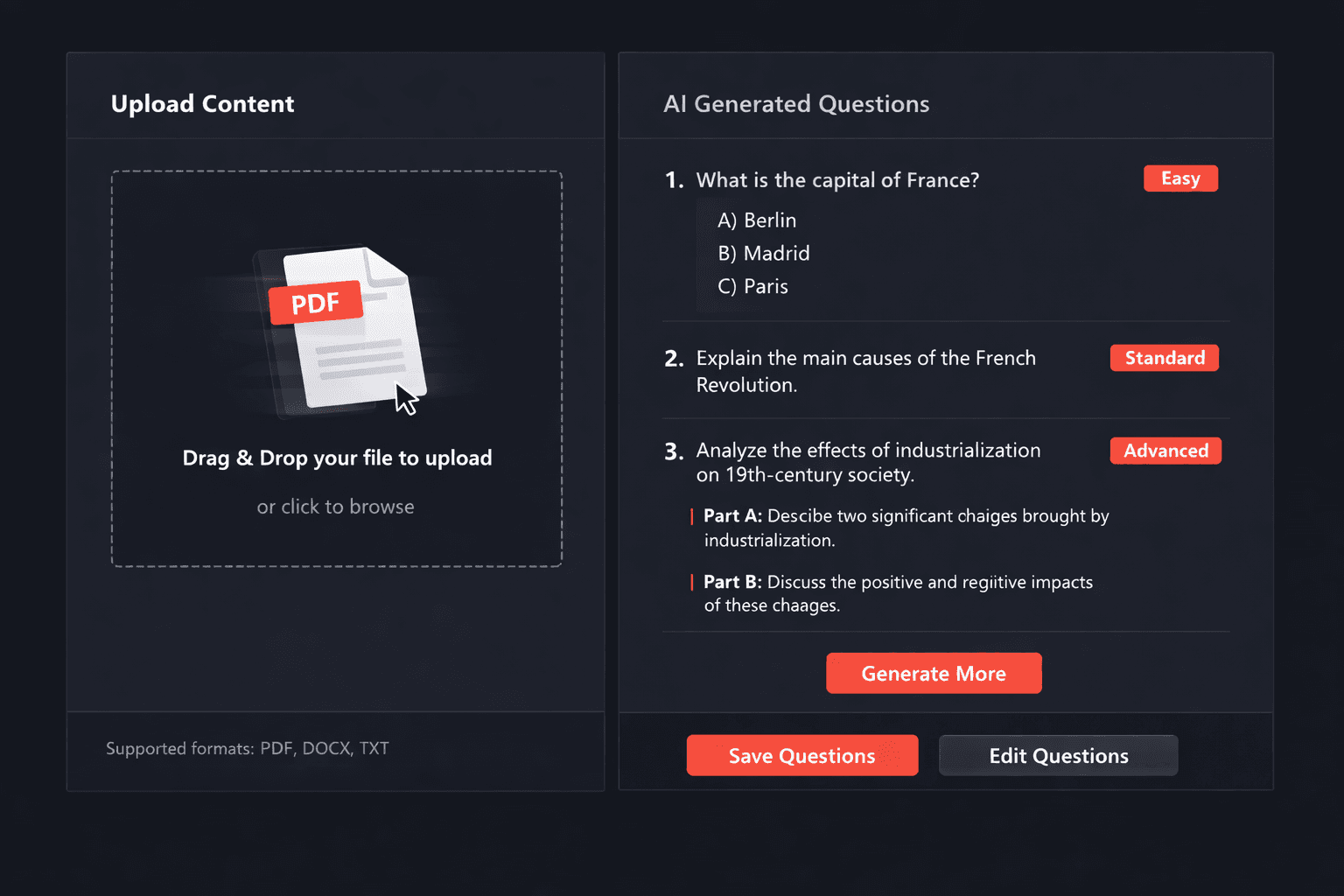
Upload PDFs, images, or text. Get MCQ, short answer, and structured questions in seconds — not hours.
Auto-Graded Assessments
Share a quiz link with students and see results in real time. No more collecting papers or manual grading.
Student Analytics
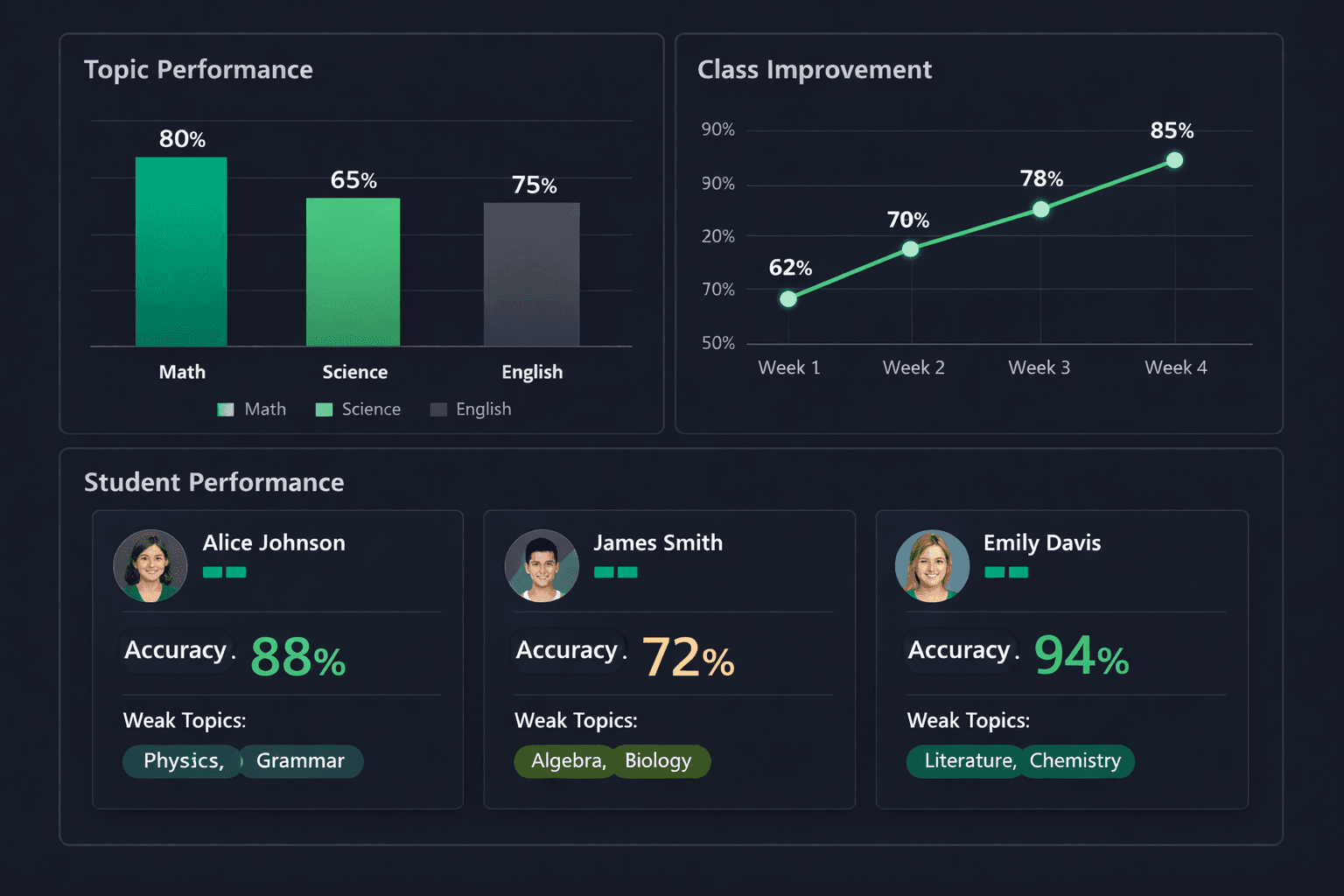
Track individual and class-wide performance. Identify knowledge gaps and adapt your teaching accordingly.
Print-Ready Worksheets
Export beautifully formatted worksheets with answer keys. Perfect for in-class tests and homework.
WhatsApp & Email Distribution
Send quiz links directly to students or parents via WhatsApp or email. One tap to share, instant access to take the test.
Progress Reports
Generate detailed progress reports for parents showing scores, improvement trends, and areas needing attention.
Upload anything, generate questions
Stop spending hours writing quiz questions manually. Upload your lesson notes, textbook chapters, or presentation slides — the AI analyzes the content and produces a complete question set with answer keys.
- PDFs, images, pasted text, YouTube transcripts
- MCQ, short answer, and structured question types
- Easy, Standard, and Advanced difficulty variants
- Automatic answer keys with explanations
Auto-graded assessments, zero effort
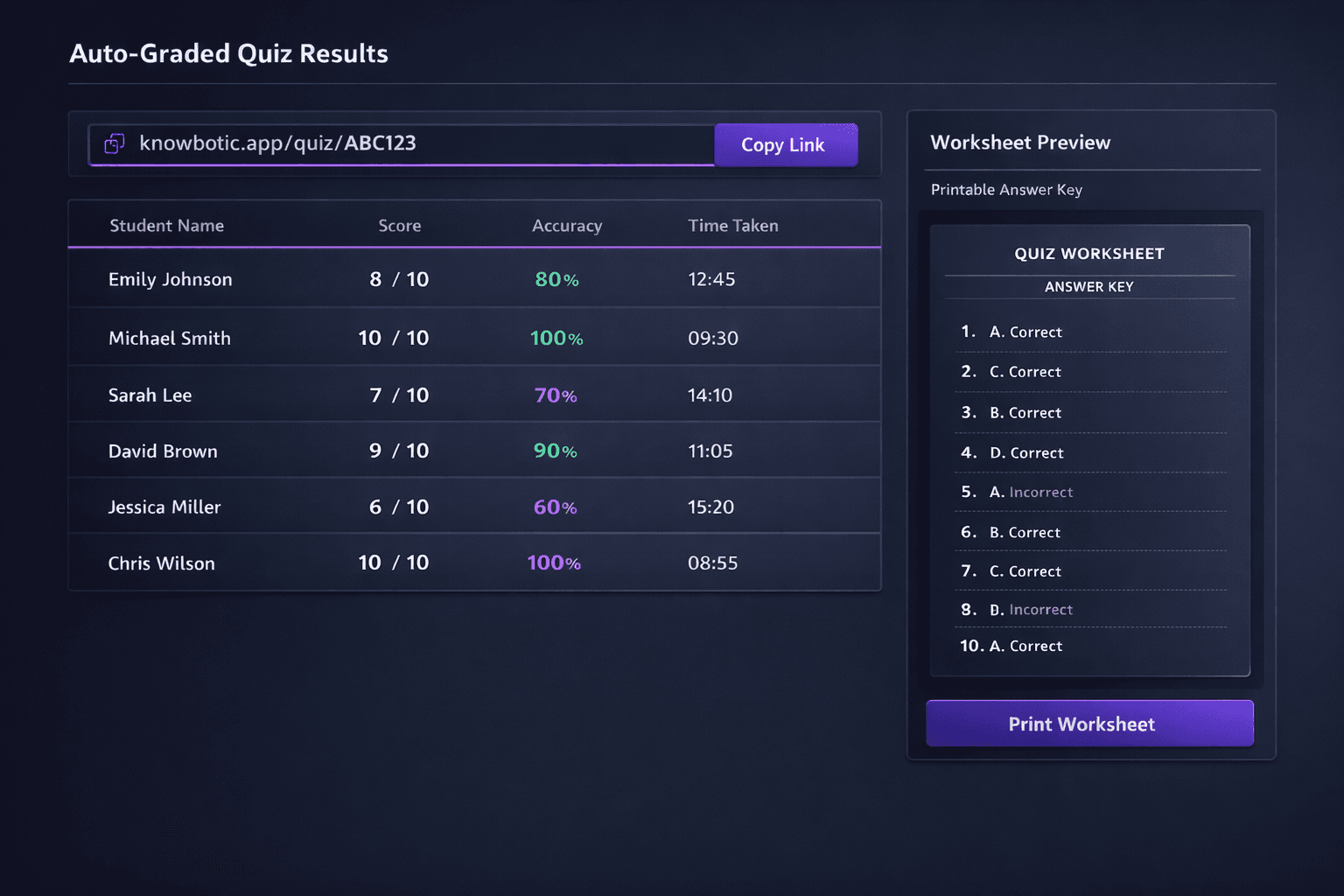
Generate a shareable link for any quiz. Students take it on any device and get instant feedback. Results stream into your dashboard — scores, accuracy breakdowns, and time spent — all automatic.
- One-click shareable quiz links
- Real-time results in your dashboard
- Print-ready worksheets with answer keys
- Export results for school records
Know exactly where students struggle
Your analytics dashboard breaks down performance by topic, difficulty level, and time. Identify which students need help and which topics need re-teaching — all in real time.
From upload to insight in four simple steps
No setup, no learning curve. Upload your materials and have a complete assessment ready in under a minute.
Upload
Drop your lesson notes, textbook PDFs, images, or paste any text
Generate
AI creates MCQ, short answer & structured questions with answer keys
Share
Send auto-graded quiz links via WhatsApp, email, or print worksheets
Track
See per-student scores, topic gaps, and improvement trends in real time
Built for every type of educator
Whether you teach primary school or prepare professionals for certification exams, Knowbotic adapts to your workflow
Science Teachers
Generate lab-ready questions from biology, chemistry, and physics materials. Perfect for weekly topic quizzes.
Math Tutors
Create problem sets from textbook chapters. Auto-graded assessments save hours of manual marking.
Language Instructors
Build vocabulary and comprehension quizzes from reading passages, articles, and lesson handouts.
Exam Prep Coaches
Generate SAT, A-Level, AP, and IB practice tests from official study guides and past papers.
University Lecturers
Turn lecture slides and research papers into assessment-ready question banks for undergraduate and postgraduate courses.
Homeschool Parents
Create structured assessments from any curriculum materials. Track progress across subjects without manual grading.
Upload any teaching material
Knowbotic reads your content and generates assessment-ready questions — no reformatting needed
From upload to insight in three steps
Knowbotic automates the entire assessment workflow — so you can focus on teaching, not paperwork
Generate
Upload any teaching material — PDFs, images, slides, or YouTube videos. AI creates MCQ, short answer, and structured questions with answer keys in under 60 seconds.
Distribute
Share auto-graded quiz links via WhatsApp or email. Print worksheets with answer keys for in-class use. Students access quizzes instantly on any device.
AI Evaluation
Results stream into your dashboard in real time. See per-student scores, topic-level gaps, and improvement trends. Generate progress reports for parents automatically.
Your time is better spent teaching
Stop spending evenings writing quizzes and grading papers. Let AI handle the busywork.
Without Knowbotic
- ✕Hours spent writing quiz questions manually
- ✕Collecting papers and grading by hand
- ✕No visibility into individual student gaps
- ✕Generic assessments that don't match your syllabus
- ✕Weekends lost to test preparation
- ✕Parents asking for progress updates you don't have
With Knowbotic
- AI generates questions from YOUR materials in seconds
- Auto-graded assessments — zero manual marking
- Per-student analytics and topic-level gap reports
- Assessments tailored to exactly what you taught
- Full quiz ready in under 60 seconds
- Automated progress reports sent directly to parents
Trusted by teachers worldwide
Educators across three continents use Knowbotic to save hours every week
“I teach three grade levels of science and used to dread quiz-writing weekends. Now I upload my notes and have differentiated assessments for each class in minutes. The auto-grading alone saves me five hours a week.”
“My students' performance has improved noticeably since I started using Knowbotic. The topic-level analytics showed me exactly where they were struggling with algebra, and I could re-teach those concepts the very next day.”
“As an English coach preparing students for standardized tests, I need high-quality comprehension questions fast. Knowbotic generates them from any reading passage I upload — and the difficulty controls are spot on.”
Frequently Asked Questions
Every hour you spend writing quizzes is an hour not spent teaching
Knowbotic gives you back your evenings and weekends.